You can create unlimited groups within the 'Inspection Library' but each Inspection Report can only belong to a single group.
To create a new group follow the instructions below;
1. |
Open the ADLInspect Manager
|
2. |
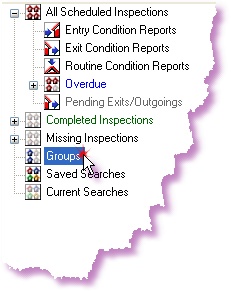
Right-click on the 'Groups' node in the Search TreeView and select 'Add Group...'
|
3. |
A window will appear asking for a 'Group Name'
Type in a relevant name and click <OK>
|
4. |
The new group will now appear under the 'Groups' node
|
Refer to Edit Display Details for instructions on how to add an Inspection Report to a group.