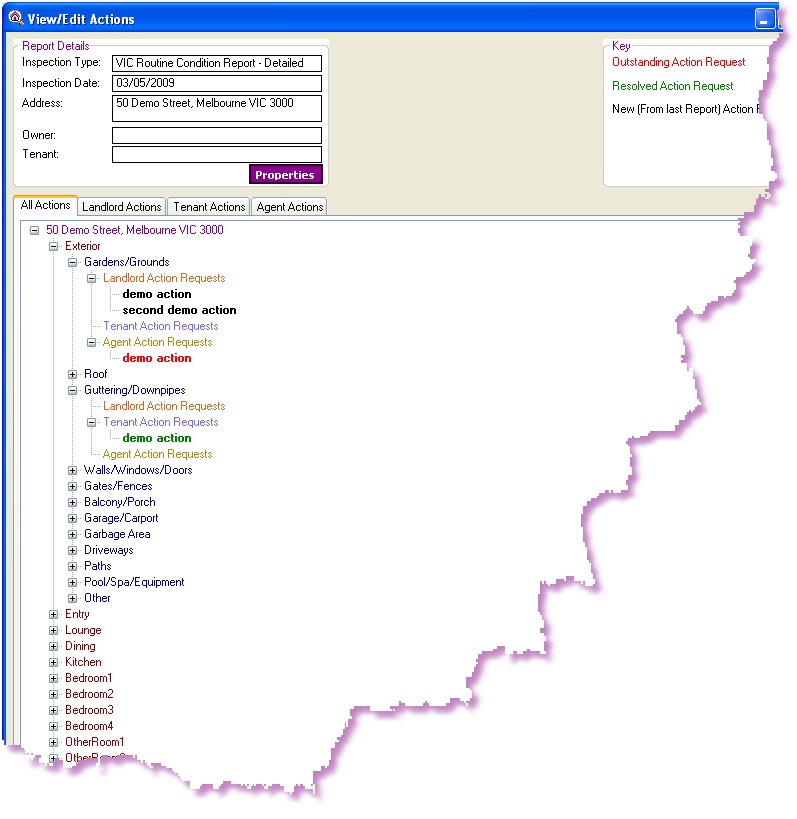
Action Requests can be viewed and edited within the ADLInspect Manager, after retrieving an inspection from the Mobile Device. You can do this by right clicking on an inspection and selecting 'View/Edit Actions'.
The TreeView displayed in the 'View/Edit Actions' window shows all the actions currently set for a property. Each action is shown under it's appropriate Room, Item and Action Request Type (ie. Landlord, Tenant or Agent). The action can also be viewed separated by the Action Request Type by clicking on either of the other 3 tabs. The actions are also colour coded to indicate whether it is New, Resolved or Outstanding (refer to the key in the top right hand corner of the 'View/Edit Actions' window), to help manage the action requests.
Within the 'View/Edit Actions' window you can;
1. |
|
2. |
|
3. |
|
4. |
|
5. |
|