ADL Software takes great care to ensure that all forms adhere to our strict version control standards. When a form is changed in anyway or replaced by another form we produce a new version of the form and distribute the new form definition.
Whenever you save a form the form is locked to the version that it is saved under.
Opening a Saved Form Which Has Had a Version Update Since Saving
When you open a saved form, which was saved under a previous version, you will be given the option to open the form in its original version or in the latest version.
| ► | If you select to open the form in its original version it will appear exactly as it did when first saved, but you will not be able to edit it. If you print the form it will print with the word "Copy" as a watermark on each page. |
| ► | If you select to open the form in the latest version, it will open as an "untitled" document ready for editing and printing as a new form. |
If for any reason the Form Definition for the version the form was originally saved in is no longer on your computer the following message will appear:
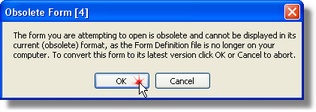
In this case it is not possible to view the form in its original format and must be converted to the latest version of the form. Click <OK> to convert to the latest version of the form.