ADLForms Professional Merge has been available since early 2004 and is far more advanced than the original Standard Merge in many ways, giving the operator greater control over the merge process and allowing for a 'many forms at a time' methodology .
Click here to view a list of software packages that support the ADLForms Professional Merge.
It is important to note that ADLForms does not 'interface to' these software packages, but these packages 'interface to' ADLForms. ADLForms does not know of the other software's presence on your computer system and has no way of interrogating their file structures. The third-party software packages create files that ADLForms can interpret to produce forms for you.
Third-party Merge Options:
Option |
Tab |
Detail |
|
Third-party Interface |
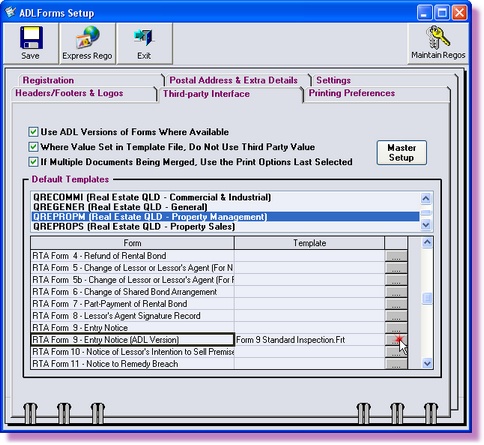
ADLForms enables you to setup the Default Template to be selected every time a particular form is merged to from within a third-party application.
For each form you require to set a Template for, click on the button to the right of the form name and select the appropriate Template from the pop-up Template Selection dialog box.
|
If Multiple Documents Being Merged, Use Print Options Last Selected |
Third-party Interface |
This option only applies to the older version of our Interface and ticking this option will have no affect on the ADLForms Professional Merge.
|
Use ADL Versions of Forms Where Available |
Third-party Interface |
This option allows you to specify that when a third-party program is trying to merge to a standard prescribed form, ADLForms is to use the ADLForms equivalent (if available).
|
Where Value Set in Template File, Do Not Use Third-party Value |
Third-party Interface |
Sometimes a third-party program may output fields that they never actually output information for or output invalid information. This can be a problem, especially where your template has the correct information for that field. By ticking this option, the Template information always overrides the third-party information if the template field is not empty.
|
Third-party Merge Setup:
1. |
Open ADLForms
|
2. |
Click on <Options> from within the ADLForms Main Menu
|
3. |
Click on the <Third-party Interface> tab
|
|
|
4. |
Set preferences as required
|
5. |
Click <Save>
|
6. |
Click on the <Exit> button to return to the 'Main Menu'
|
For further information about the third party merge please contact our friendly support team (click here for contact details)