On some forms the Agent may be able to place their details in more than one area of the form (eg. QLD RTA Form 5 {Change of Lessor or Lessor's Agent}). Where this situation occurs ADLForms allows you to swap or move your details to a different area of the form.
To Move Agent Details:
1. |
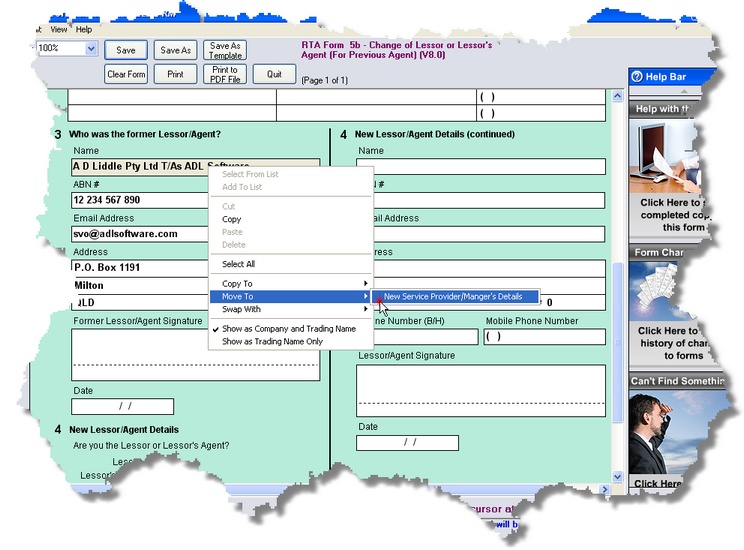
Right click in the Agent Name field (A popup menu will appear)
|
2. |
Hover the mouse pointer over the option required ('Copy To', 'Move To' or 'Swap With') until a side menu appears.
|
3. |
Select the action you require by left clicking on it.
|
|
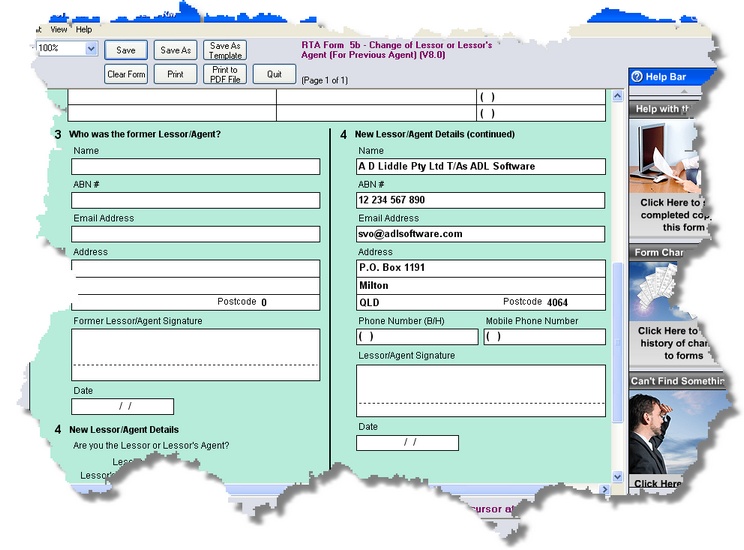
The details will be moved, copied or swapped to the new location:
|
This feature is available for many forms, but not all forms. If your details appear in the wrong place on a form try right-clicking on your name field you can see if the option is available. Some forms allow for moving, copying or swapping your details with more than one detail section.